Silence or Retire a Component
When you finish this page, one specific component will have stopped paging your team — for a maintenance window, for good, or permanently by class — while every other component that your notification rules cover keeps alerting normally.
Scope
In scope — the four per-component controls on the On-Prem Deployments pages, which control is right for each situation, and what each one can be undone by.
Out of scope — changing who is notified or on what delay, which is rule-level and covered in Configure Notifications.
How these controls relate to rules
Notification rules decide whether anyone is listening to a component family. The controls on this page decide whether one particular component is in scope at all — and they are checked before any rule is read, so a snoozed or ephemeral component is skipped no matter how your rules are configured.
Every row on the On-Prem Deployments pages carries a ... menu in the Actions column. Four of its entries change alerting, they are simple to confuse with one another, and only some of them can be undone by the person who used them.
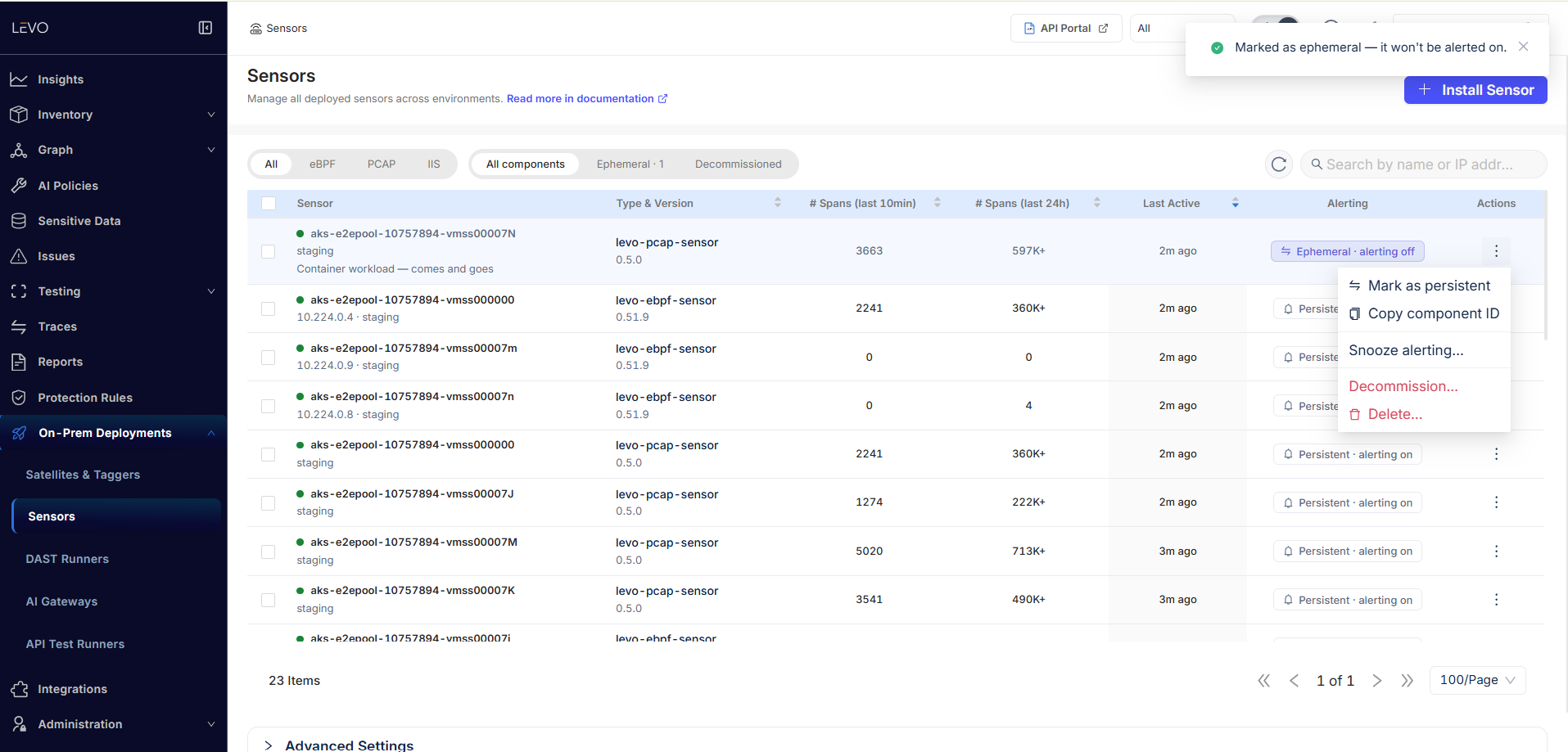
The Alerting column on each row tells you the current answer at a glance — Persistent · alerting on, or a badge showing that the row is ephemeral or snoozed. Entries that do not apply to a row are hidden rather than greyed out, so an already-ephemeral component shows Mark as persistent (as in the screenshot above) where a persistent one shows Mark as ephemeral. (Copy component ID is also in this menu; it does not affect alerting, but it is what you want when raising a support ticket about a specific component.)
| Action | What it changes | Stops alerts? | Row survives? | Reversible? |
|---|---|---|---|---|
| Mark as ephemeral | Declares this component as one that legitimately comes and goes | Yes, permanently, for this instance | Yes, listed as normal | Yes — Mark as persistent |
| Snooze alerting… | Silences alerts until an instant you pick | Yes, until that instant passes | Yes | Yes — Resume alerting, or it expires on its own |
| Decommission… | Marks the component as permanently gone | Yes — decommissioned components are never alert candidates | Yes, under Decommissioned, history intact | No undo button — but if the component re-registers, the row returns to Active on its own |
| Delete… | Removes the row outright | Yes — there is nothing left to alert on | No | No |
- Planned maintenance on one component → Snooze.
- A workload that is supposed to come and go → Mark as ephemeral.
- Decommissioned hardware you want to stop paging you, permanently → Decommission.
- Only delete when you want the row and its history gone.
Ephemeral vs Persistent
This is a statement about what kind of thing the component is, not about a temporary situation. A container workload that legitimately appears and disappears should be ephemeral: Levo will never alert on it going away.
Everything is Persistent by default — components do not declare a permanence when they register, and a blank value reads as Persistent. So your whole fleet is alertable until you say otherwise, which is the safe direction for the default to point.
Marking a component ephemeral is reversible: the same menu then offers Mark as persistent.
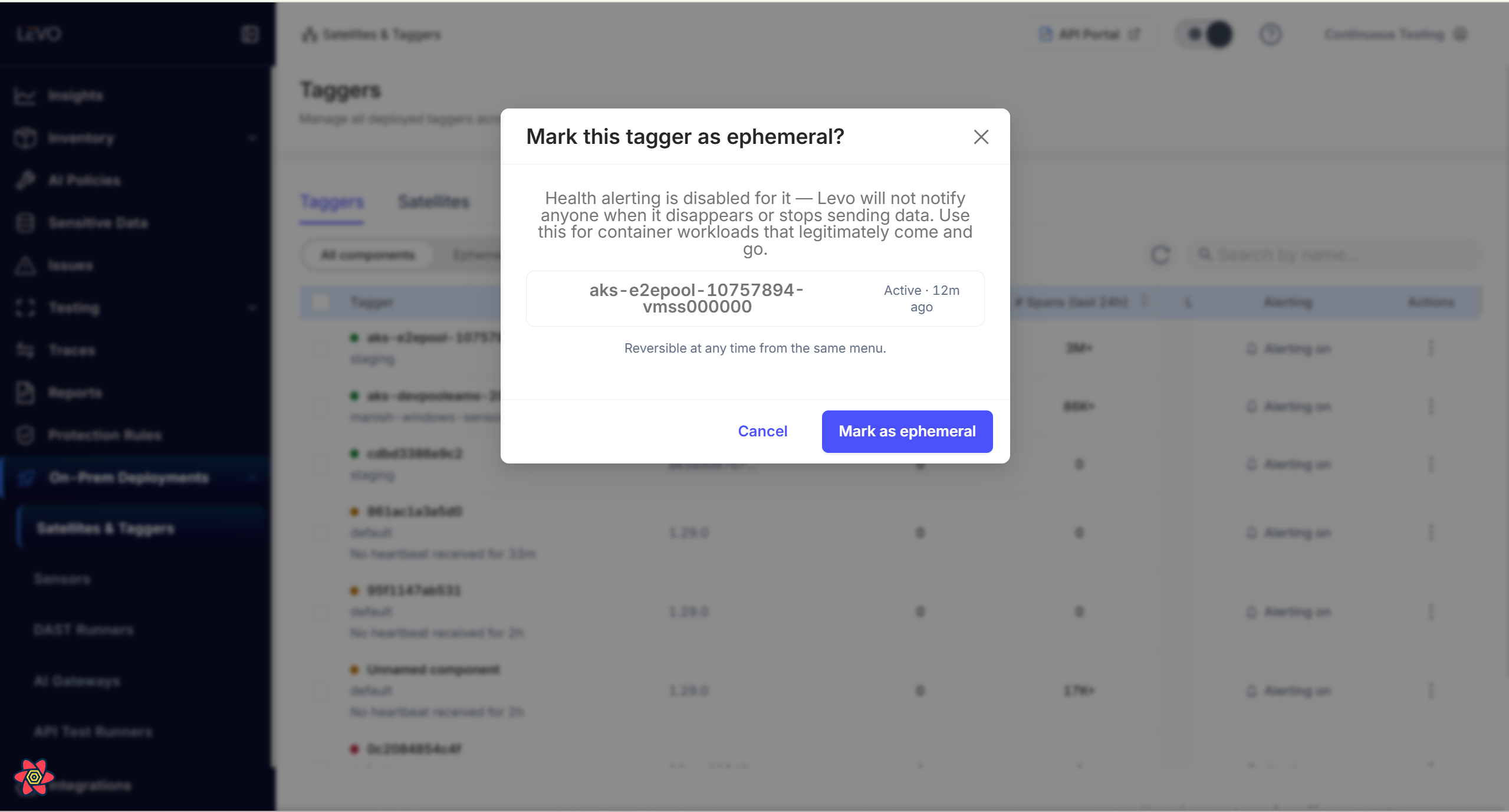
The confirmation names the component and shows its current status, and says in as many words that health alerting is disabled for it — Levo will not notify anyone when it disappears or stops sending data.
Afterwards the row states its new status plainly, as in the screenshot at the top of this page: the Alerting column changes from Persistent · alerting on to Ephemeral · alerting off, the component is labelled Container workload — comes and goes, and the Ephemeral tab count goes up by one.
Snooze
Snooze alerting… silences one component's health alerts for a duration you pick — 1 hour, 4 hours, 24 hours, or a custom number of hours up to a week. Everything else about the component is unaffected: it keeps reporting, and its status keeps updating on the page.
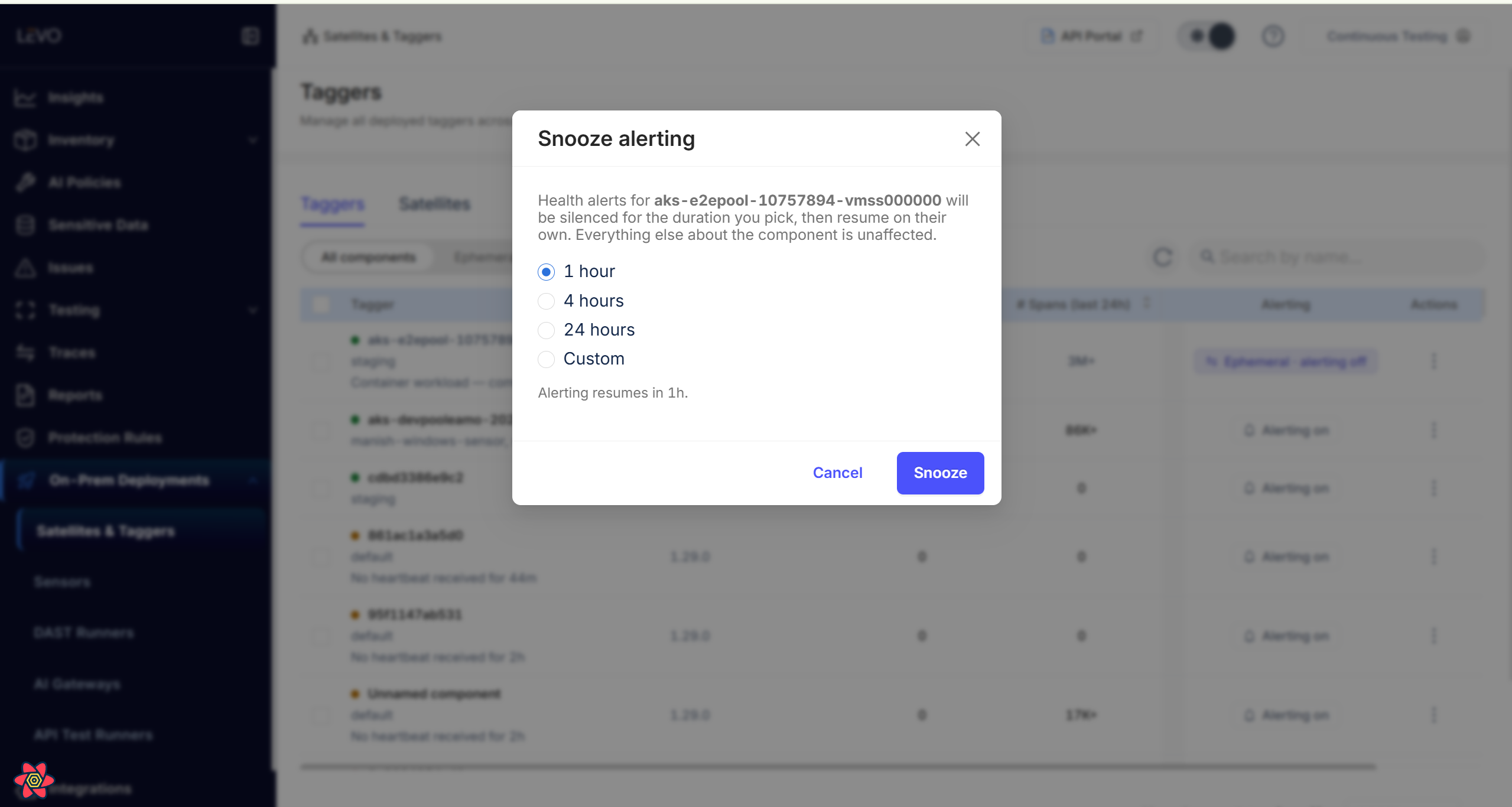
Three details matter:
- It stores an absolute instant, not a duration. It is not re-based when the component restarts or when you reload the page, so the countdown on the badge is always the truth. The dialog's footer restates the resulting expiry —
Alerting resumes in 1h.— for exactly this reason. - It expires on its own. There is no un-snooze event — "is this snoozed?" is a comparison against the current time. The page watches for the soonest expiry on screen, so the badge and the Resume alerting action disappear the moment alerting actually resumes.
- Resume alerting takes effect immediately, and is safe to use from a machine whose clock is running slightly fast.
Once snoozed, the row carries a SNOOZED badge with the time left on it, alongside whatever else applies to that component:
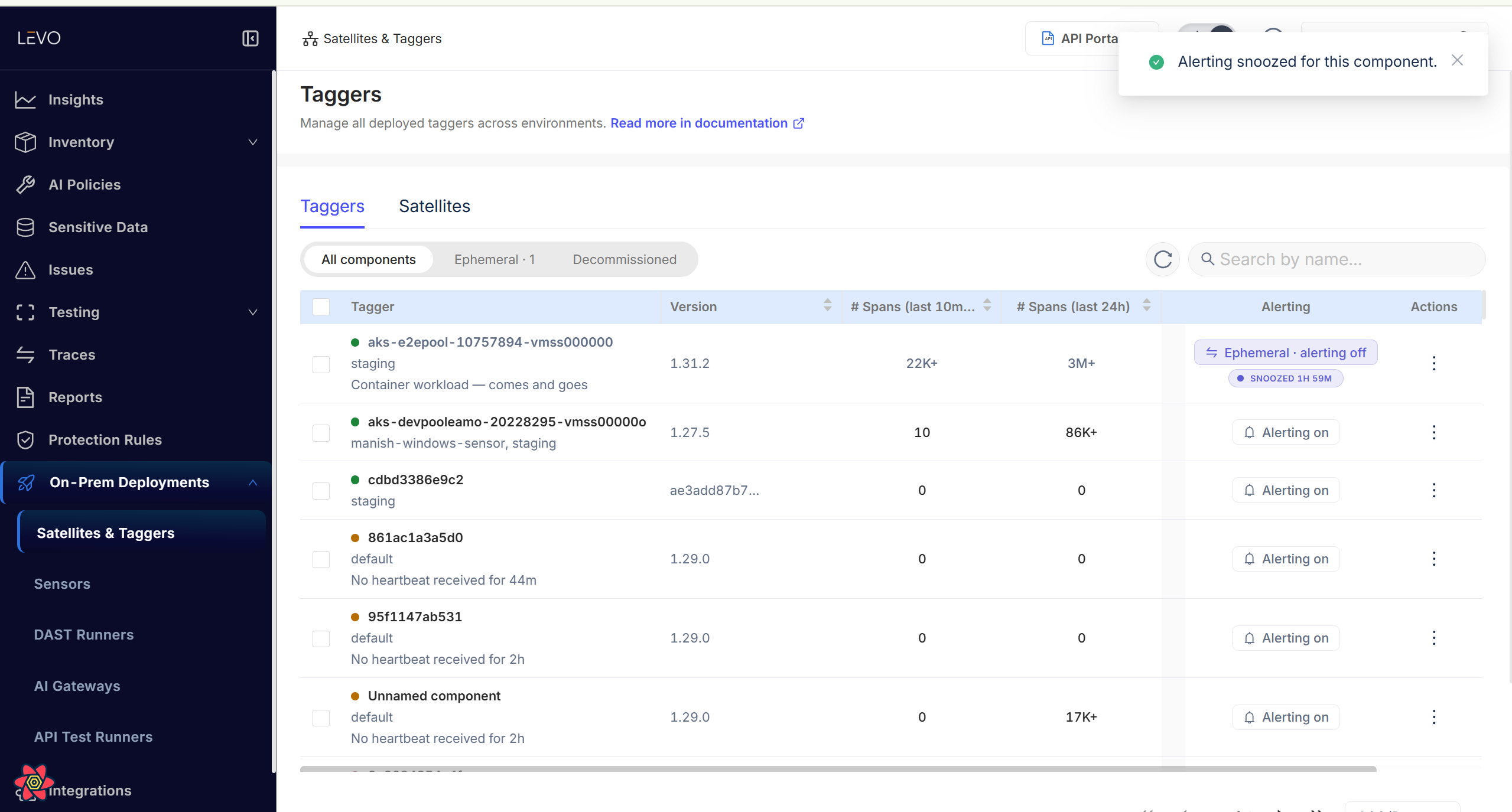
Snooze only stops alerts going out. If Levo had already alerted you about a component before you snoozed it, you will still be told when it comes back. If it never alerted you, there is nothing to tell you either way.
Decommission vs Delete
This is the distinction that catches people out:
-
Decommission records that the component is permanently gone while keeping everything you might need later. The row stays, its history stays, it appears under the Decommissioned filter, and it stops alerting for good. If your goal is for the paging to stop, this is the correct action.
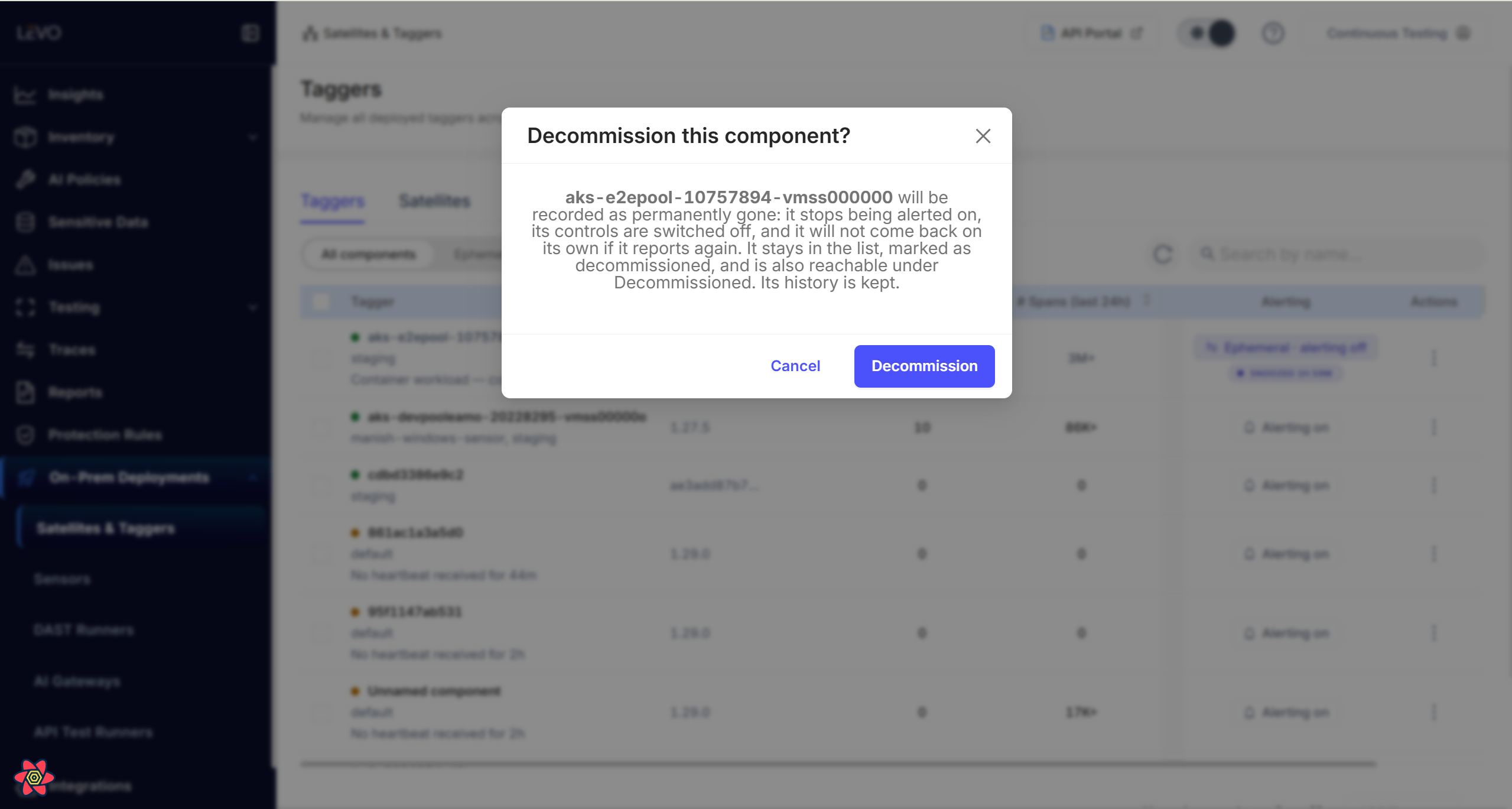
Its controls are switched off and it is recorded as permanently gone, but it stays in the list and its history is kept.
-
Delete is a hard delete. The row, its health history, and its open alerts are gone. The confirmation button reads Delete permanently, and it means it.
A decommissioned component that comes back
Decommissioning is not a permanent ban. A component can reach Decommissioned two different ways, and they reverse on different terms:
| How it was decommissioned | When this happens | What brings it back to Active |
|---|---|---|
| You used the Decommission action | Whenever you chose to | Only a genuine re-registration — the component reinstalled or restarted so that it registers with Levo again |
| Levo decommissioned it after a long silence | 7 days quiet for sensors and test runners; 30 days for Satellites, taggers, AI Gateways, and DAST Runners | Any signal at all: a single heartbeat, or one captured API call |
The difference is deliberate. When Levo decommissions a component on its own, it is acting on an assumption — weeks of silence usually mean the component is gone — so any evidence to the contrary reverses it. When you decommission a component, you are stating a fact about your own infrastructure, so Levo treats that as more authoritative than a stray signal: a leftover metrics series still arriving from a host you have already removed will not bring the row back.
Either way, bringing a component back needs nothing from you in the UI. Once it qualifies, the row returns to Active with alerting switched back on.
A component that is still running will re-register on its next heartbeat and reappear within minutes. That is not a bug in delete — stop the agent first if you want it gone for good. The confirmation dialog says so, and it names decommission as the alternative, because these are the two things people most often get wrong here.
Acting on several components at once
Tick the row checkboxes and you can apply one action to the whole selection: Decommission, Mark as ephemeral, Mark as persistent, or Delete.
Ticking rows raises a banner with the count and the bulk actions, and it says selected on current page deliberately: the header checkbox selects the rows the server returned for the page you are looking at, never your whole fleet. To act on more, change the page size or work through the pages.
A bulk delete reports three counts rather than a simple success: how many were removed, how many were already gone, and how many the server deliberately left in place because it could not close an open alert first. That last group is retryable — the dialog offers Try again.
The delete confirmation
Delete asks for confirmation, and the dialog is worth reading rather than clicking past. It names every component being deleted and lists exactly what goes:
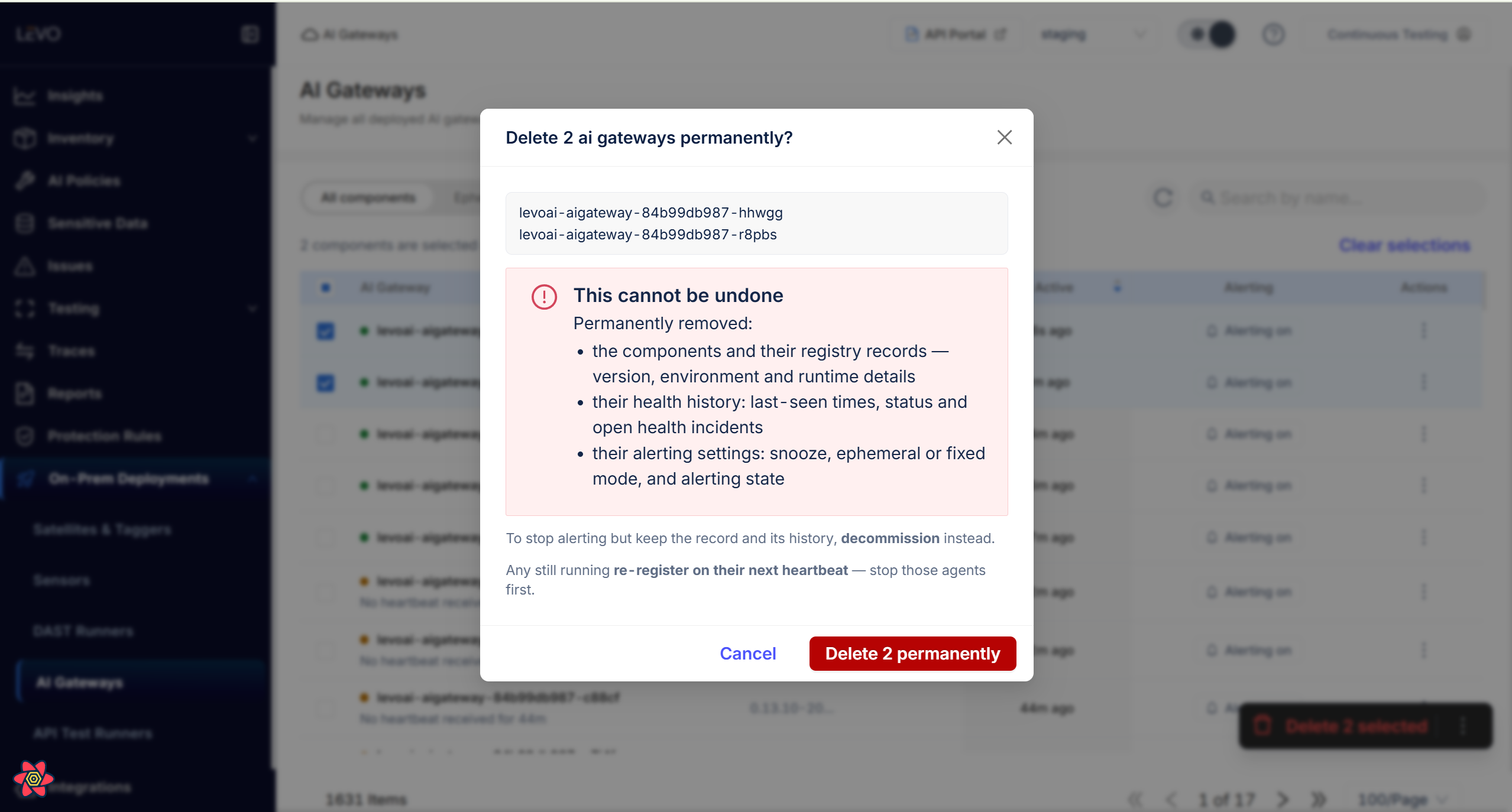
- the components and their registry records — version, environment, and runtime details
- their health history: last-seen times, status, and open health incidents
- their alerting settings: snooze, ephemeral or persistent mode, and alerting state
It also names the two things people most often get wrong here: decommission is the action to use if you only want the alerting to stop, and anything still running will re-register on its next heartbeat, so stop those agents first.
Rules are per-audience; snooze is per-component
The useful mental model:
- Notification rules decide whether anyone is listening at all, and on what timing. No enabled, thresholded, environment-matching rule means no alert is ever raised — the component sits there labelled Down.
- Snooze, ephemeral, and decommission decide whether this particular component is in scope, and are checked before rules are consulted.
So: silencing one noisy component during a maintenance window is a snooze, not a rule change — editing the rule would silence every component that rule covers. Conversely, if nobody is getting alerts for a whole component family, the rule is where to look, not the rows.
Troubleshooting
| Symptom | Likely cause | Fix |
|---|---|---|
| A component you silenced is still alerting | The control was applied to a different row with a similar display name; names are not unique | Use Copy component ID on the row and confirm you acted on the right one |
| A snooze appears to have expired early | The snooze stores a fixed end time and is not extended when the component restarts | Read the remaining time on the row's SNOOZED badge, which is authoritative |
| A deleted component reappeared within minutes | It is still running and re-registered on its next heartbeat | Stop the agent first, then delete — or decommission instead |
| A decommissioned component became Active again | It re-registered, which clears the decommissioned marking by design | Stop the agent, then decommission, or delete once it is genuinely gone |
| A bulk action affected fewer rows than expected | The header checkbox selects only the current page | Change the page size or repeat per page |
| A bulk delete reports rows left in place | Those rows had an open alert that could not be closed first | Use Try again; the operation is retryable |
Checklist
- You chose the control that matches the situation: snooze for temporary, ephemeral for by-design churn, decommission for permanently gone, delete only to erase history.
- The row's Alerting column reflects what you intended.
- For a snooze, the remaining time on the badge covers your maintenance window.
- Before deleting a component that is still running, the agent was stopped first.
- You did not edit a notification rule to silence a single component.